 Quackshell
Alpha guide
Quackshell
Alpha guide

Stop reading UI descriptions
Open the actual interface your agent is building instead of translating a paragraph into a mental picture.
Agentic computing needs a display port
Quackshell gives remote agents temporary browser links for local apps, generated previews, videos, PDFs, and reports.
See Codex hand back a live Quackshell link to a local project.
Getting Started
# Save the provided quackshell-alpha.key file to this working directory.
curl -fsSL https://quackshell.com/install/alpha.sh | sh
quackshell-cli-alpha install-key quackshell-alpha.key
quackshell-cli-alpha install-skill codex --scope user
# agent -> "Please preview this project with quackshell"
The CLI expects QUACKSHELL_ALPHA_API_TOKEN=... in the environment, quackshell-alpha.key in the project root, or ~/.quackshell/quackshell-alpha.key.
Alpha access
The alpha is intentionally small while the relay, CLI, and agent skill settle down. Email admin@claywaregames.com if you want a key for the alpha version.
Include a sentence about what you want to preview with Quackshell.
Workflow
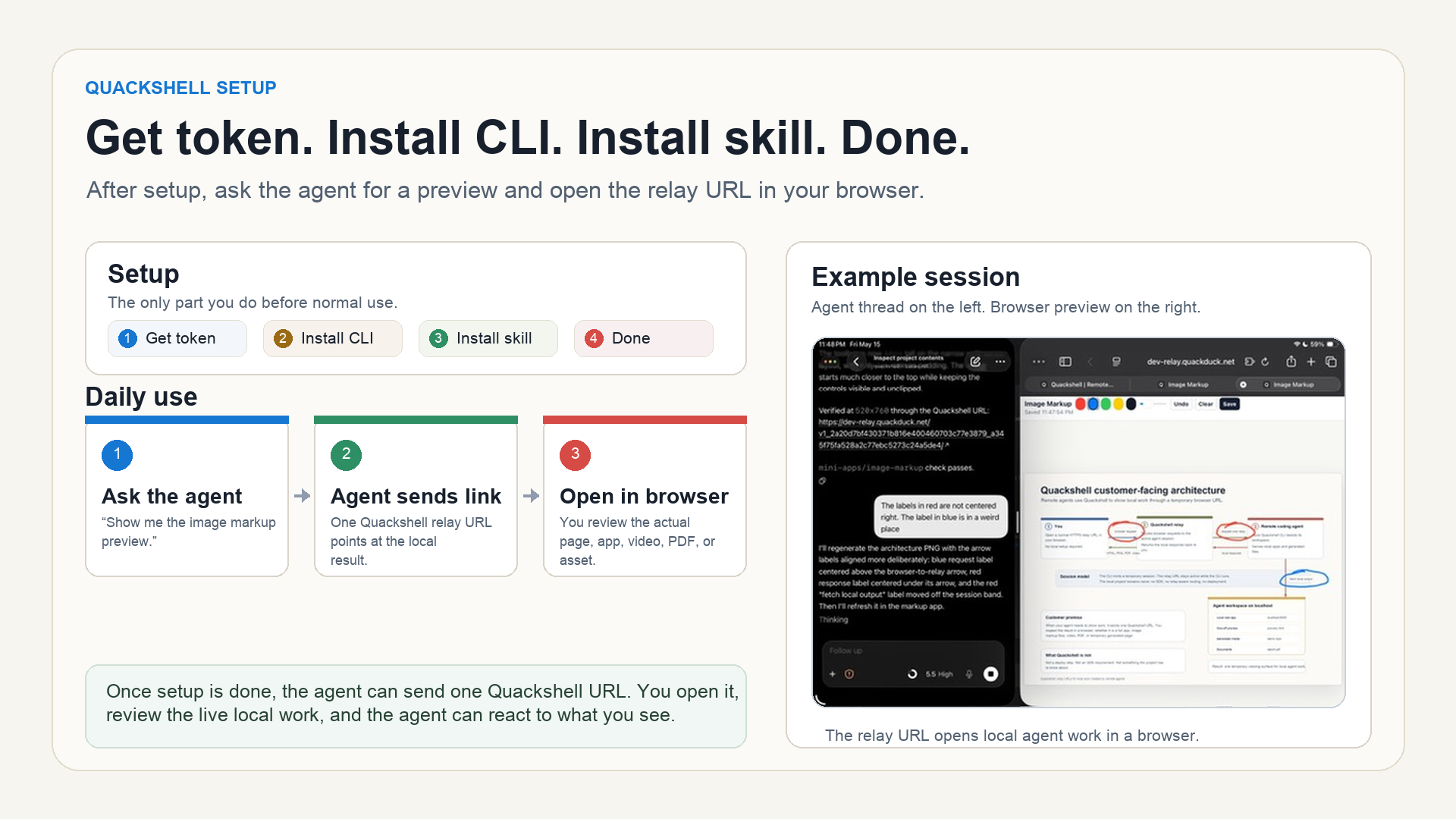
Setup is short: get a token, install the CLI, and optionally install agent instructions. After that, the agent can hand you a relay URL whenever visual proof matters.
Why it matters
Open the actual interface your agent is building instead of translating a paragraph into a mental picture.
Review throwaway HTML, visual prototypes, static reports, and generated artifacts without turning them into a deploy.
Videos, PDFs, images, and generated documents become normal browser links while the agent keeps working locally.
You react to the same thing the agent is serving, so iterations can be about the work instead of the handoff.
How it works
A full web app, a folder of generated files, a report, a video, or a temporary preview starts on localhost.
The CLI mints a temporary session, connects to the relay, and creates a public URL for that local port.
Your browser request reaches the agent's local server and the response comes back through Quackshell.
Guides
Quackshell is for short-lived previews, not long-running public-facing endpoints. Start with the guides if you are deciding when and how to use a temporary signed URL.
Use a temporary link when localhost needs to be visible from another browser.
AI coding agentsGive agents a browser-visible output channel for work they create locally.
SecurityUnderstand signed random URLs, private sharing, and what not to expose.
ComparisonChoose the right tool for temporary previews, tunnels, and public endpoints.
The key idea
Quackshell is being built so the demo project, generated artifact, or local web app does not need to know Quackshell exists. No relay-specific SDK. No session-aware frontend code. No custom asset handling. If the agent can serve it on localhost, Quackshell should make it reachable from a temporary web URL.
Current status